
HIPAA Friendly Form Builder Considerations And Limits

HIPAA friendly form builder considerations start with whether the tool can support your HIPAA obligations through a BAA, encryption, access controls, auditability, and safe data flows. A form app can be helpful for health information forms, but no software product can guarantee compliance by itself.
Definition: A HIPAA-friendly form builder is an online form, survey, or intake tool that may support HIPAA-regulated workflows when paired with the right contract, configuration, safeguards, policies, and staff practices.
Scope note: This guide is for privacy and security triage only; ask qualified legal, privacy, or compliance counsel to review any workflow that collects PHI.
TL;DR
- Do not collect PHI in any form builder unless the vendor relationship, data storage, integrations, and notification settings are appropriate for your HIPAA responsibilities.
- Look for a Business Associate Agreement, encryption in transit and at rest, role-based access, audit logs, secure transmission, and clear subcontractor policies.
- AI templates and automations can be useful, but PHI should not be sent to uncovered AI models, logs, analytics tools, or integrations.
HIPAA Friendly Form Builder Considerations At A Glance
HIPAA-friendly means a form builder may support a HIPAA compliance program; it does not mean the software alone makes your organization compliant. Start with the form’s job, then check the BAA, encryption, access controls, audit logs, retention settings, integrations, AI processing, and minimum necessary collection.
HHS reports more than 344,000 HIPAA complaints and over 1,300 corrective action cases since the Privacy Rule compliance date through 2023, according to its enforcement data source. The HHS breach portal also shows more than 540 million individual records exposed in large HIPAA breaches since 2009 source. That scale is why a “Preferred appointment time” field can’t be treated like a newsletter signup.
Tools like Forms AI can help non-technical teams create forms, surveys, quizzes, and registrations from an app, but health workflows need separate contract and safeguard review before PHI is collected.
Not every intake is harmless.
Five HIPAA Forms Facts Before You Collect Health Data
- PHI has a specific legal meaning. The HIPAA Privacy Rule defines protected health information as individually identifiable health information transmitted or maintained in any form or medium by a covered entity or business associate.
- Technical safeguards are not optional details. The HIPAA Security Rule includes access control, audit controls, integrity, authentication, and transmission security for electronic PHI, per federal regulation source.
- A BAA is often a gate, not a nice extra. If a vendor handles PHI for a covered entity or business associate, a Business Associate Agreement is usually central to the relationship.
- Setup matters as much as features. A receptionist typing beneficiary details at a front desk can still expose data if permissions, exports, or notification settings are loose.
- AI and integrations need a map first. Prompts, summaries, analytics, connected spreadsheets, and routing tools should be reviewed before PHI ever enters the workflow.
For health teams, data minimization for forms is often safer than adding extra “just in case” questions because every field creates another handling obligation.
HIPAA Form Builder Data Flow From Link To Storage
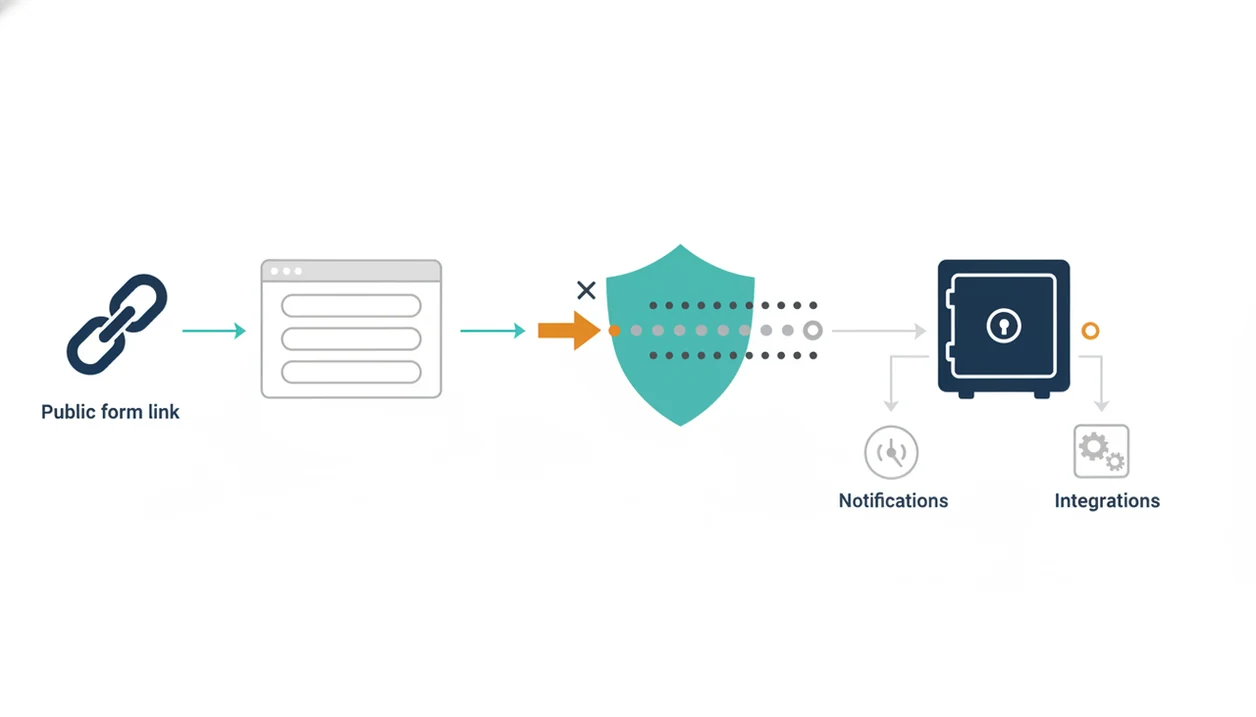
A health information form usually moves through a chain: form creation, shareable link, user submission, encrypted transmission, database storage, notifications, exports, integrations, and backups. Each step can carry PHI if the question identifies a person and relates to care, payment, health status, or services.
The risky spots are often boring. Email alerts may include full responses. Analytics scripts can observe page behavior. AI prompts may be logged. File uploads can contain lab reports, insurance cards, or referral notes. Exports may land in a spreadsheet with broad team access. Shared links can keep circulating after a campaign ends.
How HIPAA form builder data flow works: the form is only one layer in a larger ePHI system, so Security Rule safeguards must apply to collection, transmission, storage, access, integrity, and auditability.
Forms AI helps non-technical users build forms with AI templates and drag-and-drop editing, but health workflows require a separate safeguard review before live PHI is submitted.
The export folder is part of the system.
Business Associate Agreement Checks For A HIPAA Form App
Does a HIPAA form app need a Business Associate Agreement? If the vendor creates, receives, maintains, or transmits PHI for a covered entity or business associate, the BAA is usually a central checkpoint before collection starts.
A BAA is a contract that describes how PHI may be handled. It should address responsibilities, permitted uses, subcontractors, breach notification, safeguards, and what happens to data when the relationship ends. It is not legal advice to say this. It is basic workflow hygiene.
HHS describes business associate contracts as written arrangements that establish permitted uses, required safeguards, subcontractor limits, reporting duties, and return or destruction of PHI source.
Encryption alone is not a substitute for a BAA. A locked box still needs rules about who holds the key, who opens it, and where the copies go.
Before publishing a patient intake or health screening form, involve legal, privacy, or compliance advisors. That review should happen before the share link is copied into an appointment reminder.
Security Safeguards For Health Information Forms
Security safeguards for health information forms should cover the form, the response list, exports, backups, admin accounts, and connected apps. The Security Rule concepts to check are access control, audit controls, integrity, authentication, and transmission security.
- Encryption: Use encryption in transit and at rest, including for stored responses, uploads, backups, and exports.
- Access control: Require unique user accounts, role-based access, and multi-factor authentication where available.
- Auditability: Review audit logs for response access, exports, admin changes, and unusual sign-ins.
- Secure notifications: Avoid placing PHI inside ordinary email notifications. Send a minimal alert instead, such as “New intake received.”
- Retention controls: Set retention rules so old submissions and duplicate exports do not linger forever.
For general safety patterns that also apply outside HIPAA, a safe online form builder review can help teams check links, permissions, and storage before publishing.
AI Form Builder Data Flows And PHI Risk Points
AI form generation is not automatically unsafe, but PHI should not be placed into prompts or AI-assisted workflows unless the processing is covered, reviewed, and documented. Use placeholder text when drafting. “Patient A needs follow-up” is safer than a real name, diagnosis, and phone number.
Ask specific questions before using smart templates, auto-complete, routing, summaries, or analytics on health information forms. Are prompts logged? Are submissions used for model training? Which model providers or subprocessors are involved? Where is data stored? Can AI be disabled for PHI fields? Can admins see prompt history?
An AI form builder app for creating forms, surveys, quizzes, and registrations with intuitive drag-and-drop and smart templates should deliver faster drafting and clearer editing, not a shortcut around privacy review.
The practical move is simple: draft with fake examples, review the fields, remove anything unnecessary, then decide whether the final workflow is appropriate for PHI. The AI generated form review checklist is useful before a team turns a draft into a live intake.
Common Myths About HIPAA Compliant Online Forms
The real question is not whether a page says “HIPAA compliant.” The better question is whether the full workflow is properly contracted, configured, documented, and monitored.
| Myth | Better reading |
|---|---|
| A website claim guarantees your organization is compliant. | Vendor claims still need a BAA, correct setup, internal safeguards, and documented review. |
| Any encrypted form is automatically HIPAA-friendly. | Encryption matters, but it does not replace access control, audit logs, retention rules, or a BAA. |
| A HIPAA form app replaces staff training and policy work. | Staff still need rules for exports, permissions, link sharing, and response handling. |
| AI-powered forms can never be used in health-adjacent workflows. | AI may be usable for drafting or de-identified workflows if data flows and contracts are appropriate. |
For small clinics and community programs, a template, then tweak approach is often safer than building from scratch because reviewers can spot field-level risk before launch.
A last-minute dietary question before catering arrives is not the same as a symptom history field. Treat them differently.
Forms AI Fit For Non-Technical Health Information Forms
Forms AI is a form builder app that helps small businesses, teachers, event organizers, marketers, nonprofits, and freelancers create forms, surveys, quizzes, and registrations with AI templates and drag-and-drop editing. That app-first style can help non-technical teams draft intake-style forms, consent-style questionnaires, surveys, registrations, and follow-up forms without starting from a blank screen.
For health information forms, ease of drafting is only the first step. Review data sensitivity before using any AI template or HIPAA form app for PHI. Do not assume a form is appropriate for HIPAA-regulated use unless the specific plan, contract, BAA, safeguards, and data flows support that workflow.
A small business owner editing an order form from a phone between customer calls has a different risk profile than a clinic collecting insurance details. The form may look similar. The obligations are not.
When To Involve Legal, Privacy, Or Compliance Help
Involve legal, privacy, or compliance help before any new form workflow collects PHI, not after the first response arrives. Escalate immediately if you suspect PHI was exposed, sent to the wrong place, or routed through an unreviewed integration.
A short review can prevent a polished form from becoming an unmanaged health data system. Treat the review as part of launch, just like testing required fields or checking the confirmation message.
- Confirm whether your organization is acting as a covered entity, business associate, subcontractor, or outside HIPAA for this workflow.
- Review the BAA status, vendor terms, subcontractors, retention settings, breach or incident notifications, and every connected app before publishing.
- Limit the form to fields needed for the purpose, then check email alerts, exports, analytics, automations, and AI features for PHI leakage.
- Escalate suspected exposure, misdirected responses, unexpected public access, or wrong-recipient notifications to the right internal owner right away.
- Document approvals, configuration choices, disabled features, retention decisions, and reviewer notes so future audits are not reconstructed from memory.
The quiet paperwork matters. It shows why the workflow was allowed, who approved it, and what safeguards were expected to stay in place.
Limitations
No form builder can guarantee HIPAA compliance by itself. That includes traditional survey tools, intake apps, and AI-assisted builders.
- Misconfiguration can expose PHI through public links, broad permissions, shared response views, or unencrypted notifications.
- A BAA does not fix poor internal policies, weak access reviews, or collecting more information than needed.
- AI model logging, training practices, subprocessors, and storage locations may be difficult to verify without vendor documentation.
- Downstream systems can create risk, including CRMs, email tools, spreadsheets, analytics tools, payment tools, and EHR integrations.
- Smart templates can encourage teams to collect extra health details because the questions look polished.
- File uploads may contain more PHI than the visible form fields suggest.
- Exports can become uncontrolled copies if staff download them to personal devices.
- This article is informational and not legal advice.
For related privacy planning outside HIPAA, compare the separate duties in GDPR compliant form builder requirements and PCI compliant payment form requirements.
FAQ
What is a HIPAA form builder?
A HIPAA form builder is an online form, survey, or intake tool that may support HIPAA-regulated workflows when it is properly contracted, configured, secured, and monitored. The tool alone does not make the workflow compliant.
Are HIPAA forms always compliant?
No. The form content alone does not make the collection, storage, notification, access, export, or integration workflow compliant.
Does encryption make forms HIPAA friendly?
Encryption is important, but it is not enough by itself. HIPAA-friendly workflows also need appropriate contracts, access controls, auditability, policies, configuration, and safe data handling.
What is a BAA?
A BAA, or Business Associate Agreement, is a contract that sets responsibilities for a vendor that handles PHI for a covered entity or business associate. It usually addresses permitted uses, safeguards, subcontractors, breach notification, and data return or termination.
Do form builders need a BAA?
A form builder vendor may need a BAA if it creates, receives, maintains, or transmits PHI for a covered entity or business associate. The answer depends on the role, data involved, and vendor relationship.
Can Google Forms be HIPAA compliant?
The issue depends on the Google plan, BAA availability, configuration, access controls, sharing settings, and downstream handling. Organizations should verify the specific setup before collecting PHI.
Can AI forms handle PHI?
AI forms require careful review before PHI is used. Check prompts, processing, logging, model training, subprocessors, storage locations, BAAs, and whether AI can be disabled for sensitive fields.
What counts as PHI?
PHI is individually identifiable health information held or transmitted by a covered entity or business associate. It can be in electronic, paper, or oral form.
Are patient intake forms PHI?
Patient intake forms often contain PHI when they identify a person and relate to health, care, payment, insurance, symptoms, treatment, or appointments. Even simple fields can become PHI in context.
What makes online forms unsafe for health data?
Common risks include public links, email notifications containing PHI, excessive permissions, uncovered integrations, broad exports, analytics scripts, weak account security, and over-collection. Safe setup requires reviewing the full data flow.