
PCI Compliant Payment Form Requirements for Online Forms

PCI compliant payment form requirements mean your online form must collect, transmit, and protect card data under PCI DSS rules, usually by sending card details directly to a PCI-validated payment processor instead of storing raw card numbers yourself. For most small teams, the safest pattern is a secure payment form that uses hosted fields, tokenization, HTTPS, access controls, and annual PCI validation.
> Definition: A PCI compliant payment form is an online card-entry form designed so cardholder data is securely collected, encrypted in transit, routed to a PCI-validated processor, and kept out of unsafe storage locations such as databases, spreadsheets, logs, and email inboxes.
Scope note: This guide is educational and is not a PCI assessment, legal opinion, or substitute for instructions from your payment processor, acquiring bank, qualified security assessor, or security team.
TL;DR
- PCI DSS applies to any organization that stores, processes, or transmits payment card data, regardless of business size.
- The lowest-risk payment form setup avoids raw card storage and uses hosted payment fields, tokenization, or a gateway SDK.
- HTTPS is required, but PCI compliance also involves processor validation, access control, logging, scanning, testing, and annual SAQ validation.
PCI Compliant Payment Form Requirements in Plain English
A PCI compliant payment form must prevent cardholder data from leaking into places your team can casually open, export, search, or email. PCI DSS applies when a form stores, processes, or transmits card data, including the PAN or card number, CVV, expiration date, and related cardholder data.
The practical rule is simple: ordinary form fields should not collect full card numbers or CVV codes. Raw card data should not appear in form submissions, email notifications, spreadsheets, CRM notes, support tickets, exports, analytics, or logs.
Small teams are not outside the rules. A food pantry taking online donations, a teacher collecting trip payments, or an event organizer selling seats still falls under PCI if payment cards are accepted.
Tools like Forms AI can help teams build the registration, order, donation, or booking form around the payment step, but the card entry itself should be handled by a PCI-validated processor, not a plain text field in a form builder.
Five Card Data Form Security Facts Every Form Owner Should Know
Online payment forms are high-risk because card-not-present payments are both common and heavily targeted. Card-not-present payments are a major exposure point: the Federal Reserve tracks U.S. noncash payments and card-payment fraud patterns in its payments research, while merchants should confirm current CNP fraud figures against their processor’s reporting. Source: https://www.federalreserve.gov/paymentsystems/fr-payments-study.htm
- PCI DSS follows the card data. Any merchant that stores, processes, or transmits payment card data has PCI responsibilities.
- Card data should go straight to the gateway. A secure payment form sends card details to a PCI-validated processor over encrypted connections.
- Hosted fields reduce exposure. Hosted fields, tokenization, and embedded SDKs limit which systems ever touch the raw card number.
- Compliance is ongoing. PCI includes access control, vulnerability management, logging, security testing, and operational review.
- Validation still belongs to the merchant. Even with a processor, merchants usually need the correct SAQ and annual validation.
For a small shop owner editing an order form from a phone between customer calls, the safest question is not “Can I add a card field?” It is “Can the processor handle the card field instead?”
How PCI Payment Forms Work Behind the Scenes
A PCI payment form works by separating the visible form experience from the sensitive card-data path. The buyer enters card details, a hosted field, redirect, iframe, or gateway script captures the card data, the processor receives it, and the processor returns a payment result or token.
A token is not the same as a full card number. It is a reference value your system can store for receipts, refunds, status checks, or future processor actions when allowed. The form builder or website should usually store only non-sensitive metadata, such as payer name, amount, transaction ID, payment status, and token reference.
HTTPS and TLS matter, but they are not enough by themselves. Payment scripts, redirects, iframes, and SDKs affect PCI scope because they shape which systems can influence card entry. A 2020 EPJ Data Science analysis of online payment ecosystems found that third-party payment providers can reduce merchant exposure compared with fully self-hosted payment pages, because fewer merchant-controlled systems handle card entry. Source: https://epjdatascience.springeropen.com/articles/10.1140/epjds/s13688-020-00230-5
That gap is the point.
Secure Payment Form Architecture: Hosted Fields, Tokens, and Redirects
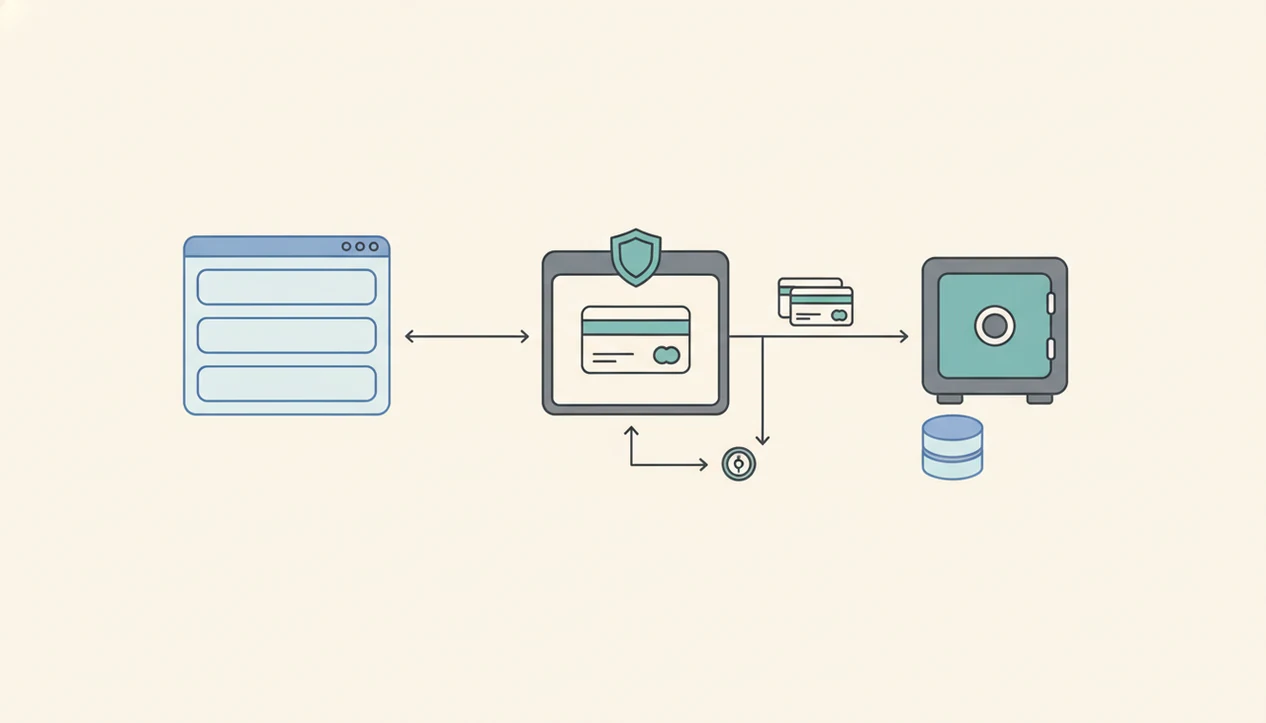
Secure payment form architecture is mostly about deciding who touches raw card data. Hosted checkout pages, hosted fields, and gateway SDKs usually keep card numbers away from the form platform, while self-hosted card fields create the broadest PCI scope.
| Architecture | Who touches raw card data | Typical PCI scope impact | Best fit |
|---|---|---|---|
| Hosted checkout page | Payment processor | Usually lowest scope | Donations, simple orders, event payments |
| Embedded hosted fields or iframes | Payment processor inside the page | Lower scope, but page security still matters | Branded forms that need card entry on-page |
| Gateway JavaScript SDK | Gateway and merchant page scripts | Varies by implementation | Custom checkout with developer support |
| Self-hosted card fields | Merchant website or app | Broadest scope | Teams with security staff and PCI expertise |
Design customization may be tighter with hosted fields. That tradeoff is usually worth it for non-technical teams taking registrations, donations, orders, or bookings.
Good AI form builder apps for creating forms, surveys, quizzes, and registrations with intuitive drag-and-drop and smart templates should deliver clear data collection around the payment, not raw card handling inside ordinary form fields.
PCI SAQ Types for Online Payment Forms
Which SAQ applies to an online payment form? The SAQ, or Self-Assessment Questionnaire, is the PCI validation form a merchant uses to document how cardholder data is handled.
SAQ A often applies when all cardholder data functions are outsourced and the merchant website does not store, process, or transmit card data. A hosted checkout redirect is a common example, though your processor decides what fits your setup.
SAQ A-EP can apply when the merchant website affects the security of the payment page, such as when card fields are embedded through scripts or iframes. That page may not receive the full card number, but it can still influence the payment experience.
Directly collecting card data can trigger more demanding SAQ categories. Confirm the SAQ type with your payment processor, acquiring bank, or qualified security assessor. Outsourcing reduces scope, but it does not remove annual validation responsibility.
Keep the paperwork boring. That is a good sign.
When to Contact Your Processor, Bank, or QSA
Contact a payment professional before a form change can alter where card data goes, who can influence the checkout, or which PCI questionnaire applies. Your processor, acquiring bank, or QSA should be part of the launch path before the form goes live, not only after something breaks.
- Ask your processor before you change payment components. Hosted fields, redirects, iframes, gateway scripts, and checkout buttons can all affect PCI scope, even when the visible form looks almost the same.
- Confirm the SAQ with your acquiring bank before annual validation. Do not guess based on a template, a previous year, or another merchant’s setup.
- Bring in a QSA when raw card data is stored, touched, or transmitted. If your website, app, database, or staff can see full card numbers, get qualified help.
- Escalate immediately when card data appears somewhere it should not. Logs, email alerts, CSV exports, analytics payloads, screenshots, or support tickets need fast containment and cleanup.
- Record the guidance and the fix. Keep processor notes, SAQ decisions, approvals, remediation steps, and launch records together so the next form edit does not restart from memory.
Common Myths About PCI Payment Forms and HTTPS
PCI payment form mistakes often start with a true statement stretched too far. HTTPS is required, but it is only one part of card data form security.
- Myth 1: HTTPS makes the form PCI compliant. Use HTTPS everywhere, then still validate the gateway, access controls, scripts, logging, and SAQ scope.
- Myth 2: A drag-and-drop or AI form builder removes PCI responsibility. Use the builder for order details, attendee names, or “Volunteer shift,” while a PCI-validated processor handles card entry.
- Myth 3: Encrypted card numbers in your database are enough. Avoid storage where possible; encryption still needs key management and remains in scope.
- Myth 4: Small businesses are exempt. PCI applies when payment cards are accepted, even for low-volume sales.
- Myth 5: Temporary storage does not count. Logs, analytics events, screenshots, and support tickets can still expose cardholder data.
For broader form safety beyond payments, a safe online form builder review should also check account access, sharing settings, and export behavior.
PCI Compliant Payment Form Checklist for Small Teams
A small-team PCI checklist should start with the form’s job, then keep card data out of the form record. For most small teams, using hosted payment fields or hosted checkout is often safer than building card fields because fewer systems touch the PAN and CVV.
- Use a PCI-validated processor or gateway. Confirm the provider’s PCI status before launch.
- Choose hosted payment fields, hosted checkout, or tokenization. Do this before styling the page.
- Enable HTTPS/TLS on every form and checkout page. Mixed content creates avoidable risk.
- Never collect CVV or full card numbers in ordinary text fields. Delete any test fields that invite it.
- Disable card data in alerts and exports. Check email, CSV, analytics, error reports, and logs.
- Limit admin access. Require strong authentication for anyone viewing responses.
- Patch site software and remove extra scripts. Payment pages should not carry old widgets.
- Confirm the SAQ and document annual validation. Keep processor notes with your launch records.
Forms AI can collect order, registration, donation, or booking details while the processor handles sensitive card entry. A teacher copying a quiz link before the bell does not need payment data mixed into the response list.
Raw Card Storage Risks in Online Form Submissions
Raw card storage expands PCI scope and increases breach impact because every copied location becomes another place to secure, monitor, and eventually clean up. Unsafe locations include form submission tables, email notifications, CSV exports, spreadsheets, CRM notes, help desk tickets, browser logs, analytics payloads, screenshots, and backups.
Encrypted storage still counts. It requires strong key management, restricted access, rotation practices, and monitoring. If the keys and data live too close together, the encryption may not protect much during a real compromise.
Web-facing systems are frequent targets, which is why payment forms should avoid storing raw card data in response tables, logs, or exports. Verizon’s Data Breach Investigations Report tracks web application involvement across breach patterns, and HHS breach data offers a separate, healthcare-specific warning about online systems that store sensitive data. Sources: https://www.verizon.com/business/resources/reports/dbir/ and https://ocrportal.hhs.gov/ocr/breach/breach_report.jsf
Use tokens and transaction IDs as operational references instead of full card numbers. If you are also deciding what non-payment data belongs on the form, data minimization for forms is the cleaner habit.
One less column to delete later.
Limitations
PCI compliance reduces payment risk, but it does not make an online form immune to fraud or security failure. Treat it as a baseline, not a promise.
- PCI compliance does not eliminate fraud, chargebacks, phishing, refund scams, or account takeover.
- A secure processor does not automatically secure your website, form builder account, admin dashboard, plugins, or third-party scripts.
- PCI DSS is a minimum baseline, not a guarantee that every attack path is closed.
- Hosted fields and gateway components can limit styling, layout control, and custom JavaScript access.
- The wrong SAQ can leave a merchant under-validated even when the payment flow feels safe.
- Obligations may change when you switch processors, embed new scripts, store new data, or add custom code.
- Accessibility still matters; a secure checkout should also follow an accessible form design checklist.
- This article is educational and should not replace guidance from a payment processor, acquiring bank, QSA, legal advisor, or security professional.
FAQ
What is a PCI payment form?
A PCI payment form is an online card-entry form built to follow PCI DSS rules for collecting, transmitting, and protecting payment card data. It usually sends card details to a PCI-validated processor instead of storing them in ordinary form submissions.
Do online forms need PCI compliance?
Online forms need PCI compliance when they store, process, or transmit cardholder data. If a form only collects non-sensitive order or registration details while a processor handles card entry, the scope may be lower.
Is HTTPS enough for PCI compliance?
No. HTTPS is required, but PCI compliance also involves processor validation, access controls, logging, vulnerability management, testing, and the correct SAQ.
Can forms store card numbers?
Ordinary form submissions should not store full card numbers. Storing raw card data increases PCI scope and breach impact.
Can forms collect CVV codes?
CVV collection should be handled only by a compliant payment processor during the transaction. CVV should not be stored in form responses, emails, logs, or exports.
What is payment tokenization?
Payment tokenization replaces sensitive card data with a non-sensitive token reference. The token can identify a transaction or payment method without exposing the full card number.
What is SAQ A?
SAQ A is typically for merchants that fully outsource cardholder data handling to a PCI-validated provider. The merchant still has validation responsibilities.
What is SAQ A-EP?
SAQ A-EP may apply when a merchant website affects the security of an embedded payment page or hosted card fields. Confirm the correct category with your processor or PCI professional.
Are small businesses exempt from PCI?
No. PCI DSS applies to merchants that accept payment cards, regardless of business size or transaction volume.
Who verifies PCI compliance?
Validation may involve the merchant, payment processor, acquiring bank, Self-Assessment Questionnaire, vulnerability scans, or a qualified security assessor. The exact path depends on payment flow and PCI scope.